- Features
Onboard clients
Communicate and team
Customer storyHow Adrian Bryan built a scalable, system-driven practiceWith TaxCalc and Engager working together.
Read the story → - Integrations
Compliance, referrals and payments
Customer storyHow Appleleaf gained control of leads, workflows and client communication"Engager understood the pain points accountants face."
Read the story → - Pricing
- Support
Learn and stay updated
Looking for practice management software?Try for free. No card details required.Packages start from as little as £9 +VAT per month.
Free 28-day trial - Get Started
Start your journey
Why firms choose Engager"In short, if you're an accountant and not using Engager, you're missing a trick. It's an invaluable tool that has significantly improved our operational efficiency and client service."Jason Holden, Founder, Holden Associates










Integrations / HMRC
 +
+HMRC agent authorisation integration for UK accountants
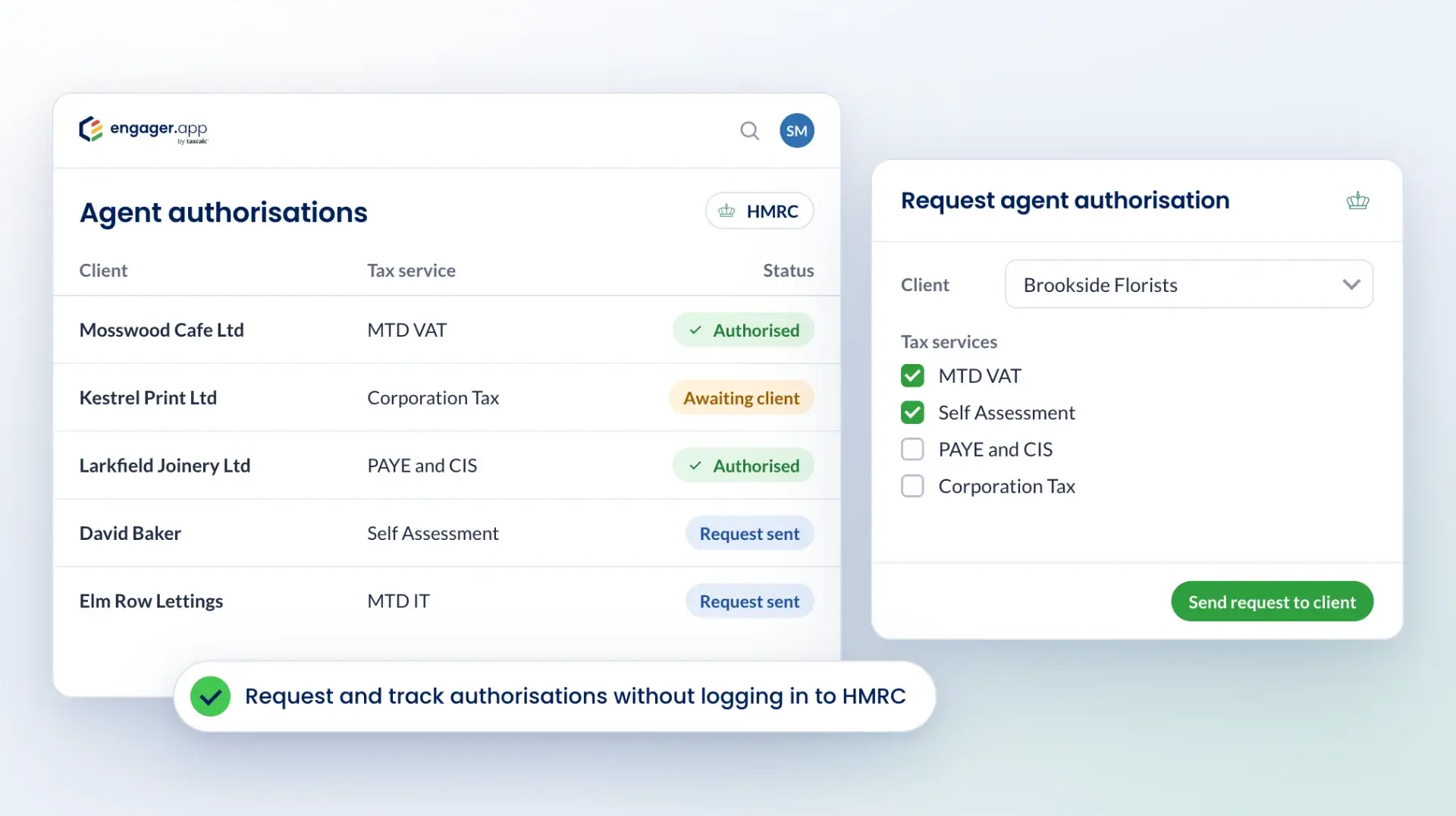
Request and track HMRC agent authorisations from Engager
Engager's HMRC integration lets you request agent authorisation from within Engager, without logging in to HMRC separately. Track the status of your authorisations for MTD VAT, PAYE and CIS, Corporation Tax and Self Assessment in one place.
See it in action
Watch the HMRC integration
Benefits of integrating
Authorisations in one place
Request and monitor agent authorisations for several tax services without leaving Engager.
Status tracking
See where each authorisation request is for MTD VAT and IT, PAYE and CIS, Corporation Tax and Self Assessment.
Fewer HMRC logins
Skip repeated logins to HMRC's platform and handle requests in Engager, with less room for error.
Clearer client updates
Keep clients informed about the status of their authorisations.
How it works
Request agent authorisation
Send authorisation requests from Engager for MTD VAT, PAYE and CIS, Corporation Tax and Self Assessment.
Track authorisation status
See the progress of each request in the client's profile.
Updates for each client
See status updates for each client without switching between platforms.
Authorisations with client data
Manage agent authorisations alongside your other client data in Engager.
How to get started
Open the HMRC integration settings
- Log in to your Engager account.
- Go to the Integrations section in the settings menu.
- Select HMRC 64-8 Integration.
Connect your HMRC Agent Services account
- Click Connect to HMRC.
- You will be taken to HMRC's login page. Enter your HMRC Agent Services credentials.
- Authorise Engager to interact with HMRC on your behalf.
Send authorisation requests
- Once connected, you can start agent authorisation requests from Engager.
- Select the client and the tax services (MTD VAT, PAYE and CIS, Corporation Tax, Self Assessment) you need authorisation for.
- Send the authorisation request to your client through Engager.
Track authorisation status
- Track the status of each authorisation request in Engager.
- When the client approves the request, the status updates.
For step-by-step guidance, visit the help centre. If you need help, contact our support team at contact@engager.app.
Questions
HMRC integration FAQs
What does the HMRC 64-8 integration do?
Engager's HMRC integration lets you manage agent authorisations within Engager, without logging in to HMRC separately. It supports authorisations for MTD VAT and IT, PAYE and CIS, Corporation Tax and Self Assessment, and you can track the status of each authorisation in one place.
How does the HMRC 64-8 integration benefit my accounting practice?
Integrating HMRC 64-8 within Engager.app streamlines the client authorisation process, allowing you to manage agent authorisations efficiently and securely without leaving the platform.
What tax services can I manage authorisations for using this integration?
The integration supports authorisations for Self Assessment, PAYE, CIS, MTD VAT, MTD IT and Corporation Tax.
How do I set up the HMRC 64-8 integration in Engager.app?
To set up the HMRC 64-8 integration in Engager:
- Open the HMRC integration settings: log in to Engager and go to Settings > Integrations > HMRC.
- Authorise Engager with HMRC: click Authorise for the tax you are integrating, log in to your HMRC Agent Services account when prompted and grant Engager the permissions it needs.
- Enter your Agent Reference Numbers: enter your HMRC Agent Reference Numbers for Corporation Tax, Self Assessment and PAYE/CIS, with no spaces, and save.
For a detailed walkthrough, visit the help centre. If you need help, contact our support team at contact@engager.app.
Are there any additional fees for using the HMRC 64-8 integration?
Engager.app does not charge extra for this integration. However, ensure that your HMRC agent registration is active and in good standing.
How secure is the data shared between HMRC and Engager.app?
Both HMRC and Engager.app prioritise data security, employing industry-standard encryption and secure servers to protect all client information and authorisation data.
Can I track the status of authorisation requests within Engager.app?
Yes, the integration provides real-time updates on the status of authorisation requests, allowing you to monitor progress and manage client permissions effectively.
More integrations