
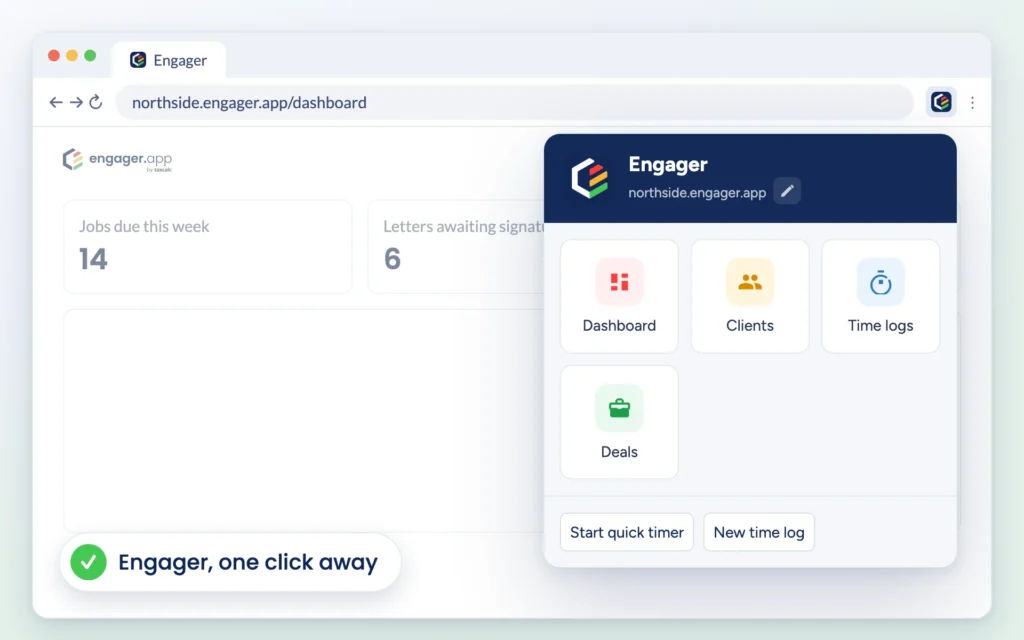
The Engager.app extension for Google Chrome is now on the Chrome Web Store. It puts your practice in your browser toolbar, so the parts of Engager you use most are always one click away, and it gives you a gentle nudge to log your time when you open a client. It is free to add.
What you can do
- Jump straight there. Open your Dashboard, Clients, Time logs or Deals in a new tab with one click, from whatever site you are on.
- Capture time without the clicks. Start a quick timer or create a new time log from the toolbar, without searching through menus.
- Get a reminder when it matters. When you open a client’s overview, a small reminder asks you not to forget to log your time. Start a timer or a time log from it, or close it.
- Snooze when you need to focus. Pause reminders for 15 minutes, 30 minutes, 1 hour or until tomorrow.
Setting it up
Add the extension from the Chrome Web Store, then click the Engager icon in your toolbar. Type the part of your Engager address before .engager.app, for example northside for northside.engager.app, and select Save. You only need to do this once, and you can change it at any time with the pencil next to your address.
The extension needs an existing Engager account. It only runs on Engager pages, and the developer has disclosed on the Chrome Web Store that it will not collect or use your data.
Find out more
See how each part works on the Chrome extension feature page, or read more about time tracking in Engager. Not using Engager yet? Start a free 28-day trial, with no card details required, or book a demo and we will show you around.